Stop Polling, Start Living
In this post: What SSE is and why we preferred it here · The real SSE endpoint and fan-out · Dual-channel multiplexing and replay · Full pipeline and data models · SignalR comparison and hypothetical implementation · Decision matrix · Why we chose SSE and when we’d switch · Debugging, auth, and extension patterns · Conclusion.
TL;DR — For one-way market data we chose SSE over SignalR: simpler, no client library, standard HTTP, and easier to debug. Use SignalR when you need bidirectional communication or groups.
Welcome back, architects and dreamers.
We live in an age where “refreshing” a webpage is considered a failure of the human spirit. We want now. We want instant. We want to see numbers on a screen flicker upward like the heartbeat of a capitalist economy.
Real-time updates are no longer a “nice-to-have.” They are the air we breathe. Most modern UI applications expect live data streams, because God forbid a user should have to click a button to see if their portfolio is down 20%.
When building the Stock Market Simulator—a living laboratory for event-driven patterns that doesn’t care about your feelings, only throughput—one of the first architectural decisions was: How do we push real-time price updates to thousands of concurrent users efficiently?
For years, SignalR has been the go-to answer in the .NET ecosystem. And SignalR is wonderful. It’s a powerhouse. It’s the Swiss Army Knife that also happens to be a chainsaw. But sometimes, you don’t need a chainsaw. Sometimes, you just need to whisper into the ear of the browser.
This post explores both options through the lens of real-world stock market data streaming—and explains why we chose SSE for the Stock Market Simulator, building the plumbing from scratch so we’d actually understand what’s flowing through the pipes.
SSE: What It Is and Why We Chose It
What is SSE?
SSE is a W3C standard that enables servers to push data to clients over a single, long-lived HTTP connection. Think of it as HTTP that keeps talking to you even after it’s done.
Technical Characteristics
- Protocol
- HTTP/1.1 or HTTP/2
- Direction
- Server → Client (unidirectional)
- Content-Type
text/event-stream- Auto-reconnection
- Yes (built into browsers)
- Message Format
- Plain text with
event:anddata:fields
Why SSE Instead of SignalR?
SignalR is a powerhouse. It handles WebSockets, Long Polling, and SSE automatically. It provides a full-duplex communication channel. However, it comes with a footprint: a specific protocol (Hubs), a required client-side library, and a need for “sticky sessions” or a backplane (like Redis) for scaling. You know, “sticky sessions”—that thing that sounds fun but ruins your load balancer’s day.
SSE is different because:
- Unidirectional: Designed specifically for streaming data from server to client. Market data flows one way—from the exchange to the trader’s screen. The server has all the answers anyway.
- Native HTTP: Just a standard HTTP request with a
text/event-streamcontent type. No custom protocols, no upgrade negotiation. - Automatic Reconnection: Browsers natively handle reconnections via the
EventSourceAPI. It’s like having an assistant who automatically redials when the call drops. - Lightweight: No heavy client libraries or complex handshake logic. Just pure, unfiltered data.
SignalR in 60 seconds: Microsoft’s abstraction for bidirectional real-time communication. It picks the best transport (WebSockets, SSE, or long polling), gives you Hubs, Groups, and a client library—at the cost of protocol and scaling complexity (e.g. backplane or sticky sessions). More on SignalR later.
The SSE Endpoint and Pipeline
The Stock Market Simulator’s Broker Service exposes SSE endpoints using ASP.NET Core controllers on .NET 10. The SseController sets the standard SSE headers, registers a per-client channel, and streams events using IAsyncEnumerable:
[HttpGet("stream")]
public async Task Stream(CancellationToken cancellationToken)
{
    // Configure SSE response headers
    Response.Headers.Append("Content-Type", "text/event-stream");
    Response.Headers.Append("Cache-Control", "no-cache");
    Response.Headers.Append("Connection", "keep-alive");
    Response.Headers.Append("X-Accel-Buffering", "no"); // Disable nginx buffering

    var clientId = Guid.NewGuid().ToString("N");

    // Stream events using IAsyncEnumerable pattern
    await foreach (var sseEvent in StreamEventsAsync(clientId, cancellationToken))
    {
        await Response.WriteAsync(sseEvent, cancellationToken);
        await Response.Body.FlushAsync(cancellationToken);
    }
}
When a client hits this endpoint:
- The server sends
Content-Type: text/event-stream— telling the browser “keep this connection open” - A dedicated bounded channel is created for this specific client via
SseClientManager - As market ticks arrive from Redis, they’re fanned out to every client’s channel and flushed down the open HTTP pipe
Notice the X-Accel-Buffering: no header — a production detail that disables nginx response buffering. Without it, your reverse proxy will helpfully collect all your real-time events into one big batch and deliver them with the enthusiasm of a postal service.
The Minimal API Alternative
The same Broker Service also exposes a Minimal API version, demonstrating the cleaner .NET 10 pattern:
app.MapGet("/api/marketdata/stream-minimal", async (
    SseClientManager clientManager,
    ILogger<Program> logger,
    HttpResponse response,
    CancellationToken cancellationToken) =>
{
    var clientId = Guid.NewGuid().ToString("N");

    response.Headers.Append("Content-Type", "text/event-stream");
    response.Headers.Append("Cache-Control", "no-cache");
    response.Headers.Append("Connection", "keep-alive");

    var (tickChannel, _) = clientManager.Register(clientId);

    try
    {
        await response.WriteAsync(
            FormatSseEvent("connected", new { clientId, timestamp = DateTime.UtcNow }),
            cancellationToken);
        await response.Body.FlushAsync(cancellationToken);

        await foreach (var data in tickChannel.Reader.ReadAllAsync(cancellationToken))
        {
            await response.WriteAsync(
                FormatSseEvent("marketdata", data),
                cancellationToken);
            await response.Body.FlushAsync(cancellationToken);
        }
    }
    catch (OperationCanceledException) { }
    finally
    {
        clientManager.Unregister(clientId);
    }
});
Both approaches work. The Minimal API version is more concise; the controller version is more structured. Choose your preferred ceremony level.
The Future: .NET 10’s Results.ServerSentEvents
ASP.NET Core 10 is introducing a native Results.ServerSentEvents API that wraps any IAsyncEnumerable into an SSE response with zero boilerplate—no manual header setting, no FlushAsync calls:
// What the future looks like — not yet used in this project,
// but this is where SSE in .NET is heading
app.MapGet("/api/prices/stream", (
    ChannelReader<MarketDataEvent> channelReader,
    CancellationToken cancellationToken) =>
{
    return Results.ServerSentEvents(
        channelReader.ReadAllAsync(cancellationToken),
        eventType: "marketdata");
});
The Stock Market Simulator deliberately uses the manual approach to expose the underlying mechanics—bounded channel management, event formatting, backpressure handling—that Results.ServerSentEvents would abstract away. Understanding these primitives matters when debugging production streaming issues.
Pros of SSE
- Simple: No special libraries needed, works with standard HTTP
- Efficient: Single connection, minimal overhead
- Auto-Reconnection: Built into browser's EventSource API
- Firewall-Friendly: Uses standard HTTP/HTTPS ports
- HTTP/2 Multiplexing: Multiple streams over one TCP connection
Cons of SSE
- Unidirectional: Client can't send data back without separate HTTP requests
- Connection Limits: Browsers limit ~6 connections per domain (HTTP/1.1). With HTTP/2, multiplexing reduces the impact—multiple streams can share one connection.
- No Binary: Text-only protocol (JSON overhead)
- No Custom Headers in EventSource: The browser's
EventSourceAPI doesn't support settingAuthorizationheaders — you need cookie-based auth or token query parameters - IE Support: Not supported in Internet Explorer (but honestly, who cares anymore?)
The Fan-Out Problem (The Part Nobody Talks About)
Here’s something the tutorials leave out: System.Threading.Channels reads are destructive. When you read a message from a channel, it’s gone. If two SSE clients share a single Channel<MarketDataEvent>, only one of them gets each tick. The other client stares at a blank screen, wondering why they invested in technology.
The Stock Market Simulator solves this with a per-client channel architecture:
public class SseClientManager
{
    private readonly ConcurrentDictionary<string, Channel<MarketDataEvent>> _clients = new();
    private readonly ConcurrentDictionary<string, Channel<CandlestickEvent>> _candleClients = new();

    public (Channel<MarketDataEvent> TickChannel, Channel<CandlestickEvent> CandleChannel)
        Register(string clientId)
    {
        var tickChannel = Channel.CreateBounded<MarketDataEvent>(
            new BoundedChannelOptions(_channelCapacity)
            {
                SingleReader = true,
                SingleWriter = false,
                FullMode = BoundedChannelFullMode.DropOldest
            });

        var candleChannel = Channel.CreateBounded<CandlestickEvent>(
            new BoundedChannelOptions(_channelCapacity)
            {
                SingleReader = true,
                SingleWriter = false,
                FullMode = BoundedChannelFullMode.DropOldest
            });

        _clients[clientId] = tickChannel;
        _candleClients[clientId] = candleChannel;
        return (tickChannel, candleChannel);
    }
}
Each SSE client gets its own pair of bounded channels — one for raw ticks, one for candlestick events. The TickBroadcaster then fans out every incoming tick to all registered client channels plus a dedicated aggregator channel:
public class TickBroadcaster
{
    private readonly SseClientManager _clientManager;
    private readonly Channel<MarketDataEvent> _aggregatorChannel;

    public void Broadcast(MarketDataEvent tick)
    {
        // Fan out to all connected SSE clients
        _clientManager.BroadcastTick(tick);

        // Also feed the candlestick aggregator
        if (!_aggregatorChannel.Writer.TryWrite(tick))
        {
            _logger.LogWarning(
                "Aggregator channel full, tick for {Symbol} dropped", tick.Symbol);
        }
    }
}
Note the use of BoundedChannelFullMode.DropOldest and non-blocking TryWrite. In financial streaming, a late price is worse than a missing one. The system intentionally drops stale ticks rather than blocking producers — backpressure handled by design, not by accident.
Dual-Channel Multiplexing (Two Streams, One Connection)
The Stock Market Simulator doesn’t just stream raw tick data. It also streams pre-computed OHLCV candlestick events — 1-minute candles aggregated server-side by the CandlestickAggregator. Both data types flow over a single SSE connection using event type multiplexing.
Here’s the actual streaming loop inside SseController:
// Multiplex both tick and candle channels into a single SSE stream
while (!cancellationToken.IsCancellationRequested)
{
    var tickWait = tickReader.WaitToReadAsync(cancellationToken).AsTask();
    var candleWait = candleReader.WaitToReadAsync(cancellationToken).AsTask();

    await Task.WhenAny(tickWait, candleWait);

    // Drain all available ticks
    while (tickReader.TryRead(out var marketData))
    {
        yield return FormatSseEvent("marketdata", marketData, $"{clientId}-{eventId++}");
    }

    // Drain all available candle events
    while (candleReader.TryRead(out var candleEvent))
    {
        yield return FormatSseEvent("candlestick", candleEvent, $"{clientId}-c{eventId++}");
    }

    // Heartbeat every 15 seconds to keep proxies from closing idle connections
    if ((DateTime.UtcNow - lastHeartbeat).TotalSeconds >= 15)
    {
        yield return FormatSseEvent(
            "heartbeat", new { timestamp = DateTime.UtcNow },
            $"{clientId}-heartbeat");
        lastHeartbeat = DateTime.UtcNow;
    }
}
The Task.WhenAny pattern avoids busy-wait polling — the loop only wakes when either channel has data. Then TryRead drains whatever is available before yielding back. The heartbeat prevents proxies and load balancers from killing “idle” connections.
The SSE event formatter follows the W3C spec precisely:
public static string FormatSseEvent(string eventType, object data, string? id = null)
{
    var sb = new StringBuilder();

    if (!string.IsNullOrEmpty(id))
        sb.AppendLine($"id: {id}");

    sb.AppendLine($"event: {eventType}");
    sb.AppendLine($"data: {JsonSerializer.Serialize(data, CamelCaseOptions)}");
    sb.AppendLine(); // Empty line signals end of event

    return sb.ToString();
}
The browser receives events like:
- id: abc123-42event: marketdatadata: {"symbol":"NIFTY50","price":1042.37,…}
- id: abc123-c43event: candlestickdata: {"symbol":"NIFTY50","intervalStart":"…","open":1040,…}
Handling Missed Events (The “Oops, Did You Drop That?” Protocol)
The simple endpoints we just looked at are great. They work. They ship. But, like most things in life, they have a weakness: they’re missing resilience.
One of the biggest challenges with real-time streams is connection drops. The internet is a fragile series of tubes held together by hope and duct tape. By the time the browser automatically reconnects, several events might have already been sent and lost. Your user thinks the stock price is stable, meanwhile, the market has crashed, and they’re ruined.
To solve this, SSE has a built-in mechanism: the Last-Event-ID header. When a browser reconnects, it sends this ID back to the server, saying, “I was listening, then I fell asleep. Catch me up.”
The Stock Market Simulator exposes this via GET /api/marketdata/stream-with-replay. The SseControllerV2 implements it with a MarketEventBuffer — a lock-guarded circular buffer with monotonic event IDs:
[HttpGet("stream-with-replay")]
public async Task StreamWithReplay(
    [FromHeader(Name = "Last-Event-ID")] string? lastEventId,
    CancellationToken cancellationToken)
{
    Response.Headers.Append("Content-Type", "text/event-stream");
    Response.Headers.Append("Cache-Control", "no-cache");
    Response.Headers.Append("Connection", "keep-alive");
    Response.Headers.Append("X-Accel-Buffering", "no");

    var clientId = Guid.NewGuid().ToString("N");

    await foreach (var sseEvent in StreamEventsWithReplayAsync(
        clientId, lastEventId, cancellationToken))
    {
        await Response.WriteAsync(sseEvent, cancellationToken);
        await Response.Body.FlushAsync(cancellationToken);
    }
}
Inside the streaming method, reconnecting clients get their missed events replayed from the buffer:
// Replay missed events if Last-Event-ID is provided
if (!string.IsNullOrWhiteSpace(lastEventId))
{
    var missedEvents = _eventBuffer.GetEventsAfter(lastEventId);

    foreach (var missedEvent in missedEvents)
    {
        yield return FormatSseEvent(
            missedEvent.EventType ?? "marketdata",
            missedEvent.Data,
            missedEvent.Id);
    }
}
The MarketEventBuffer itself is straightforward — a LinkedList with a configurable size cap (default: 1,000 events):
public class MarketEventBuffer
{
    private readonly LinkedList<SseEventItem<MarketDataEvent>> _buffer = new();
    private readonly int _maxBufferSize;
    private readonly object _lock = new();
    private long _eventCounter = 0;

    public SseEventItem<MarketDataEvent> Add(MarketDataEvent marketData)
    {
        lock (_lock)
        {
            var eventId = Interlocked.Increment(ref _eventCounter);
            var sseItem = new SseEventItem<MarketDataEvent>
            {
                Data = marketData,
                EventType = "marketdata",
                Id = eventId.ToString()
            };

            _buffer.AddLast(sseItem);
            if (_buffer.Count > _maxBufferSize)
                _buffer.RemoveFirst();

            return sseItem;
        }
    }

    public IEnumerable<SseEventItem<MarketDataEvent>> GetEventsAfter(string lastEventId)
    {
        lock (_lock)
        {
            if (!long.TryParse(lastEventId, out var lastId))
                return _buffer.ToList();

            return _buffer
                .Where(item => long.TryParse(item.Id, out var id) && id > lastId)
                .ToList();
        }
    }
}
By combining this buffer with the Last-Event-ID header provided by the browser, the system replays missed messages upon reconnection—ensuring chart continuity even through network hiccups.
The Full Data Pipeline
Before we compare SSE with SignalR, it’s worth seeing how the data actually flows through the Stock Market Simulator. The architecture is an event-driven pipeline orchestrated by .NET Aspire:
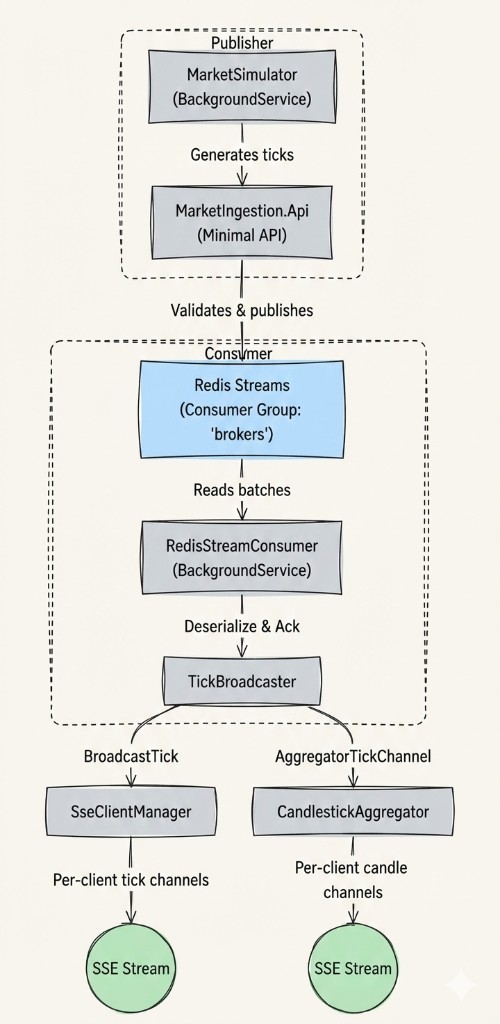
Each layer has explicit error handling and backpressure. The RedisStreamConsumer retries on connection failures with escalating delays (2s → 5s → 10s). The TickBroadcaster uses non-blocking TryWrite so a slow client never blocks the pipeline. The CandlestickAggregator throttles candle emissions to 500ms to prevent overwhelming the browser.
The Data Models
// Raw tick — what the market simulator generates
public record MarketDataEvent
{
    public string Symbol { get; init; } = string.Empty;
    public decimal Price { get; init; }
    public long Volume { get; init; }
    public DateTime Timestamp { get; init; }
}

// Aggregated candle — computed server-side by CandlestickAggregator
public record CandlestickEvent
{
    public string Symbol { get; init; } = string.Empty;
    public DateTime IntervalStart { get; init; }
    public decimal Open { get; init; }
    public decimal High { get; init; }
    public decimal Low { get; init; }
    public decimal Close { get; init; }
    public long Volume { get; init; }
    public int TickCount { get; init; }
    public bool IsComplete { get; init; }
}
SignalR
What is SignalR?
SignalR is Microsoft’s abstraction layer that provides bidirectional communication between server and client. It’s the tank you bring to a knife fight. It automatically chooses the best transport:
- WebSockets (preferred)
- Server-Sent Events (fallback)
- Long Polling (ultimate fallback)
Technical Characteristics
- Protocol
- WebSocket (preferred), SSE, Long Polling
- Direction
- Server ↔ Client (bidirectional)
- Message Format
- JSON or MessagePack
- Connection Management
- Automatic with reconnection logic
- Scaling
- Built-in Redis backplane support
What SignalR Would Look Like (The Road Not Taken)
For reference, here’s how the Stock Market Simulator’s streaming could have been implemented with SignalR. This code is not in the project — it’s the conceptual equivalent to illustrate the trade-offs:
// SignalR Hub — hypothetical equivalent of SseController
public class PriceHub : Hub
{
    public async Task SubscribeToSymbol(string symbol)
    {
        await Groups.AddToGroupAsync(Context.ConnectionId, symbol);
    }

    public async Task UnsubscribeFromSymbol(string symbol)
    {
        await Groups.RemoveFromGroupAsync(Context.ConnectionId, symbol);
    }
}

// Background service pushing to Hub — hypothetical equivalent of RedisStreamConsumer
public class PriceStreamService : BackgroundService
{
    private readonly IHubContext<PriceHub> _hubContext;

    protected override async Task ExecuteAsync(CancellationToken ct)
    {
        await foreach (var tick in _redisConsumer.ReadStreamAsync(ct))
        {
            await _hubContext.Clients
                .Group(tick.Symbol)
                .SendAsync("ReceiveTick", tick, ct);
        }
    }
}
Notice what SignalR gives you for free: the Groups concept. Each stock symbol becomes a group, and clients subscribe/unsubscribe dynamically. No SseClientManager, no ConcurrentDictionary, no manual fan-out. But you also lose visibility into the channel mechanics — when things go wrong, you’re debugging an abstraction.
Client-Side JavaScript (SignalR):
// Requires: npm install @microsoft/signalr
const connection = new signalR.HubConnectionBuilder()
    .withUrl("/hubs/prices")
    .withAutomaticReconnect()
    .build();

connection.on("ReceiveTick", (tick) => {
    updatePriceCard(tick.symbol, tick.price, tick.delta);
});

await connection.start();
await connection.invoke("SubscribeToSymbol", "NIFTY50");
Pros of SignalR
- Bidirectional: Client can send commands to server
- Groups: Built-in support for broadcasting to subsets of clients
- Automatic Reconnection: Configurable retry policies
- Transport Abstraction: Falls back gracefully
- Scaling: Redis backplane for multi-server deployments
- Typed Hubs: Strongly-typed client/server contracts
Cons of SignalR
- Complexity: More moving parts, harder to debug
- Library Dependency: Requires SignalR client library (
@microsoft/signalr) - Resource Usage: WebSocket connections consume server resources
- Sticky Sessions: Load balancers need special configuration (and they won't be happy about it)
Comparison and Decision
Consuming SSE in JavaScript (The Easy Part)
On the client side, you don’t need to install a single npm package. The browser’s native EventSource API handles connection management, including automatic reconnection with the Last-Event-ID header.
Here’s the actual useMarketData hook from the Stock Market Simulator’s React frontend:
export function useMarketData(brokerUrl: string): UseMarketDataResult {
  const [securities, setSecurities] = useState<Map<string, Security>>(new Map());
  const [isConnected, setIsConnected] = useState(false);
  const [error, setError] = useState<string | null>(null);

  useEffect(() => {
    const streamUrl = `${brokerUrl}/api/marketdata/stream`;
    const eventSource = new EventSource(streamUrl);

    eventSource.addEventListener('connected', (e) => {
      const data = JSON.parse(e.data);
      console.log('Connected to broker:', data.clientId);
      setIsConnected(true);
    });

    // Tick events → watchlist + banner (real-time per-tick)
    eventSource.addEventListener('marketdata', (e) => {
      const marketData: MarketDataEvent = JSON.parse(e.data);
      updateSecurity(marketData);
    });

    // Candlestick events → chart (1-minute OHLCV from backend aggregator)
    eventSource.addEventListener('candlestick', (e) => {
      const candleData: CandlestickEvent = JSON.parse(e.data);
      updateCandle(candleData);
    });

    eventSource.addEventListener('heartbeat', (e) => {
      console.debug('Heartbeat:', JSON.parse(e.data).timestamp);
    });

    eventSource.onerror = () => {
      setIsConnected(false);
      if (eventSource.readyState === EventSource.CLOSED) {
        setError('Connection lost. Reconnecting...');
      }
    };

    return () => eventSource.close();
  }, [brokerUrl]);
}
Note how the client listens for four distinct event types — connected, marketdata, candlestick, and heartbeat — all multiplexed over a single SSE connection. No SignalR client library, no npm dependency, no build step required. The browser handles reconnection natively.
Comparison Table
| Feature | SSE | SignalR |
|---|---|---|
| Communication | Unidirectional (Server → Client) | Bidirectional (Server ↔ Client) |
| Protocol | HTTP/1.1, HTTP/2 | WebSocket, SSE, Long Polling |
| Browser Support | Modern browsers (no IE) | All browsers (fallback support) |
| Auto-Reconnect | Yes (native) | Yes (configurable) |
| Message Format | Text (JSON) | Binary (MessagePack) or JSON |
| Scaling | Simple (stateless) | Complex (Redis backplane) |
| Firewall Friendly | High | Medium (WebSocket may be blocked) |
| Connection Limit | 6 per domain (HTTP/1.1) | Higher (WebSocket) |
| Client Library | None (native browser API) | Required (signalr.js) |
| Binary Data | No | Yes |
| Groups/Rooms | Manual | Built-in |
| Auth via Headers | Not with EventSource API | Yes (fully supported) |
| Use Case | One-way notifications | Interactive applications |
Decision Matrix: When to Use What?
Choose SSE When:
- Data flows only from server to client
- You need simplicity and minimal dependencies
- Your use case is notifications, updates, or feeds
- You want firewall-friendly communication
- You’re building a public API that others will consume
- You appreciate that the client just needs to
curlyour endpoint
Examples:
- News tickers and stock price feeds
- Social media live updates
- Server monitoring dashboards
- Event logs streaming
- Notification bells (the kind that make you feel important)
Choose SignalR When:
- You need bidirectional communication
- Client must send commands to the server
- You need groups or targeted broadcasting
- You’re in a .NET ecosystem already
- You need Redis backplane for horizontal scaling
- You want automatic transport negotiation
- You’re building something where users interact, not just observe
Examples:
- Chat applications
- Collaborative editing
- Online gaming
- Trading platforms with order placement
- Real-time dashboards with user-controlled filters
The Stock Market Simulator Decision
For the Stock Market Simulator, I chose SSE over SignalR. Here’s the architectural reasoning:
Reasons for SSE:
The data is unidirectional: Market data flows one way — from the exchange to the trader’s screen. There’s no order placement, no chat, no client-to-server commands. SSE is a natural fit for this data flow.
Understanding the primitives: SignalR abstracts away connection management, channel fan-out, and event replay. By implementing SSE at a lower level, the project demonstrates the underlying patterns — bounded channel management, event replay buffers, backpressure handling, and dual-channel multiplexing. Understanding these primitives matters when debugging production streaming issues, regardless of the transport layer.
Zero client dependencies: The React frontend uses the browser’s native
EventSourceAPI. No@microsoft/signalrpackage, no version compatibility concerns, no bundle size impact.Debuggability: You can test the SSE endpoint with
curl. Try doing that with a WebSocket Hub.Standard HTTP infrastructure: SSE works through proxies, CDNs, and load balancers without special configuration (beyond disabling response buffering). No WebSocket upgrade negotiation, no sticky sessions.
When I’d Switch to SignalR:
If the project evolves to support order placement, per-user watchlist subscriptions via the server, or collaborative features, SignalR would become the right choice. SignalR’s built-in Groups would replace the manual SseClientManager, and the bidirectional channel would enable client-to-server communication without separate REST endpoints.
The goal isn’t to prove SSE is “better” than SignalR. It’s to use the lightest tool that solves the problem — and to understand the plumbing that heavier tools abstract away.
Debugging and Extensions
SSE Debugging
The beautiful thing about SSE? You can test it with curl:
# Test SSE endpoint directly — watch data flow in real-time
curl -N http://localhost:5002/api/marketdata/stream

# In Chrome DevTools:
# Network → Filter: "event-stream" → Click connection → EventStream tab
No Fiddler. No Wireshark. No crying. Just curl.
SignalR Debugging
// Enable detailed logging
builder.Services.AddSignalR()
    .AddHubOptions<PriceHub>(options =>
    {
        options.EnableDetailedErrors = true;
        options.KeepAliveInterval = TimeSpan.FromSeconds(10);
    });
Extension Patterns
Adding Authentication to SSE
Since the browser’s EventSource API doesn’t support custom headers, you can’t pass a JWT in the Authorization header. The Stock Market Simulator documents two production-ready approaches:
Cookie-based auth: Cookies are sent automatically with every request, including
EventSourceconnections. Use your existing cookie auth middleware.Short-lived token flow: Exchange a JWT for a 30-second token via a login endpoint, pass it as a query parameter to the SSE endpoint. Store tokens in Redis with TTL to minimise the attack surface. Note: tokens in URLs can end up in server logs and referrers; cookie-based auth avoids that.
// Conceptual: Token-based SSE auth
app.MapGet("/api/marketdata/stream", async (
    [FromQuery] string token,
    SseClientManager clientManager,
    ITokenValidator tokenValidator,
    HttpResponse response,
    CancellationToken ct) =>
{
    var userId = await tokenValidator.ValidateAsync(token);
    if (userId is null)
    {
        response.StatusCode = 401;
        return;
    }

    // Proceed with SSE stream for authenticated user...
});
Per-User Filtering
The current architecture broadcasts all market data to all connected clients. For per-user streams at scale, the documented pattern is a ConnectionManager backed by ConcurrentDictionary<UserId, Channel<T>> — conceptually similar to SignalR’s IHubContext. Producers write to user-specific channels; SSE endpoints read from the user’s channel exclusively.
Hybrid Approach: SSE + SignalR
Here’s a pragmatic pattern for projects that need both:
// Public API: SSE for simplicity (third-party friendly)
app.MapGet("/api/prices/stream", async (/* ... */) =>
{
    // Manual SSE streaming — no client library needed
    // Any language can consume this with an HTTP client
});

// Web App: SignalR for rich interaction (your own frontend)
app.MapHub<PriceHub>("/hubs/prices");
This gives you:
- Public API consumers use SSE (no library needed, language-agnostic)
- Your own frontend uses SignalR (full features, bidirectional)
- Same data pipeline feeds both (DRY principle maintained)
Code Architecture Patterns
The Channel Pipeline Pattern
The Stock Market Simulator’s architecture is built on .NET’s System.Threading.Channels — a high-performance, bounded, async-aware producer/consumer primitive. The entire data flow is a chain of channels:
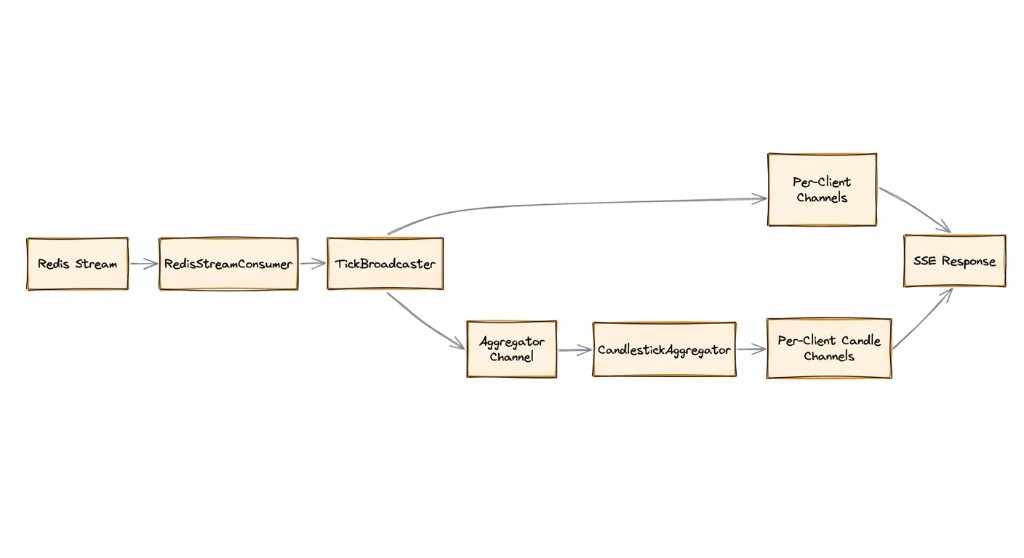
Key design principles:
- Bounded channels everywhere:
BoundedChannelFullMode.DropOldestprevents memory exhaustion. A stale price is worse than no price. - Non-blocking writes:
TryWriteensures a slow consumer never blocks the producer pipeline. - Single-reader optimisation: Each per-client channel sets
SingleReader = true, allowing the runtime to skip synchronisation overhead. - Explicit fan-out: The
TickBroadcasterreplaces implicit shared-channel semantics with explicit broadcasting to N consumers.
Historical Candle Seeding
When a new client connects, the SSE controller (SseControllerV2) sends historical candlestick data so the chart has visual density immediately — instead of showing an empty chart for the first 60 seconds while the first candle completes:
// Replay historical candles so chart has density immediately
var allHistory = _history.GetAllHistory();
foreach (var (symbol, candles) in allHistory)
{
    foreach (var candle in candles)
    {
        yield return FormatSseEvent(
            "candlestick", candle, $"{clientId}-h{historyCount++}");
    }
}
Conclusion
Both SSE and SignalR are excellent choices for real-time communication. The decision boils down to:
| SSE | SignalR |
|---|---|
| Simplicity | Full-featured |
| Standard HTTP protocols | Bidirectional communication |
| One-way data flow | .NET ecosystem integration |
| Zero client dependencies | Built-in scaling with Redis backplane |
None (native EventSource) | Required (@microsoft/signalr) |
SSE is the perfect fit for simple, one-way updates like dashboards, notification bells, and stock market feeds. It’s lightweight, HTTP-native, and easy to debug with nothing more sophisticated than curl.
SignalR remains the robust, battle-tested choice for complex bidirectional communication or when you need groups, presence, and all the bells and whistles.
Pro Tip: Start with SSE if you’re unsure. You can always upgrade to SignalR later when you need bidirectional communication. The reverse is harder — removing complexity is always more painful than adding it.
Choose the lightest tool that solves your problem; understand the plumbing so you can debug it when it breaks. Ship the code. Go home.
Explore the Full Project
GitHub Repository: Stock Market Simulator
Architecture Decisions: ADRs — SSE vs SignalR, Redis Streams vs Kafka, and more
Questions or feedback? Let’s discuss on GitHub Issues.